Aides and companions on a trip
Record the aides who attend your residents, then pick who's actually coming on each trip. There are two places an aide can live, and which one you use depends on how they work.
Which kind of aide is this?
| If the aide… | Add them under | Why |
|---|---|---|
| Attends one resident (a private aide, possibly several who rotate by day) | That resident's record — 👥 Residents → Edit → Aides / Companions | You pick which of their aides is coming that day, and the driver sheet shows who they're with |
| Covers whoever comes from their care area or wing (an agency or facility-area aide) | The staff list — 🧑💼 Staff → + Add Staff, ticking "🤝 Not a facility employee" | They aren't tied to one resident, so you pick them once for the whole trip |
The short version: attends one resident → the resident's record. Covers a care area → the staff list.
Add a private aide to a resident
- Go to 👥 Residents and click Edit on the resident.
- Under Aides / Companions, click + Add Aide.
- Fill in the aide's name, phone, and an optional note — the agency they work for, or which days they usually come. The note is just for your staff to read; RideLogger doesn't act on it.
- Add as many as the resident has, then click 💾 Save.
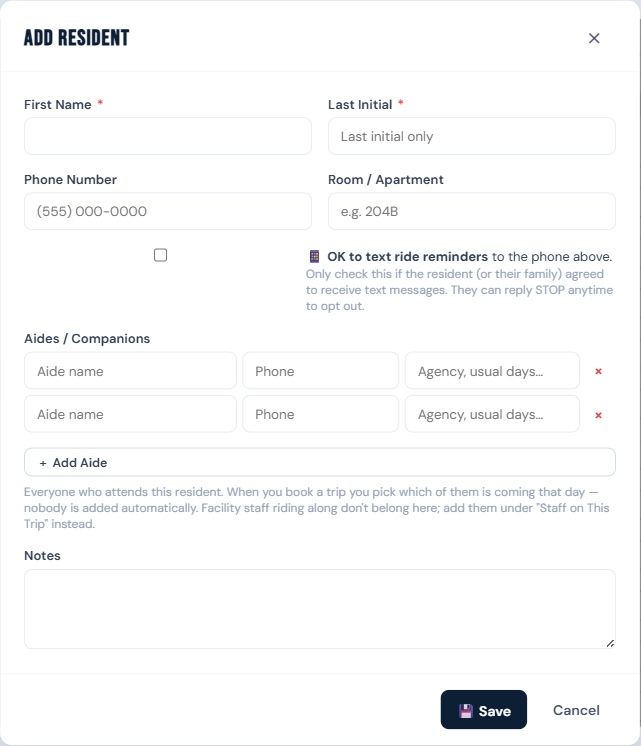
A resident can have any number of aides. Nothing is scheduled automatically from this list — it's the menu you'll choose from when you book a trip.
Put an aide on a trip
- Start a trip as usual (see Schedule a trip).
- Pick the resident. Their aides appear as chips just below their name, under the heading AIDES.
- Tap the aide who is actually coming. The chip fills in to show they're attached.
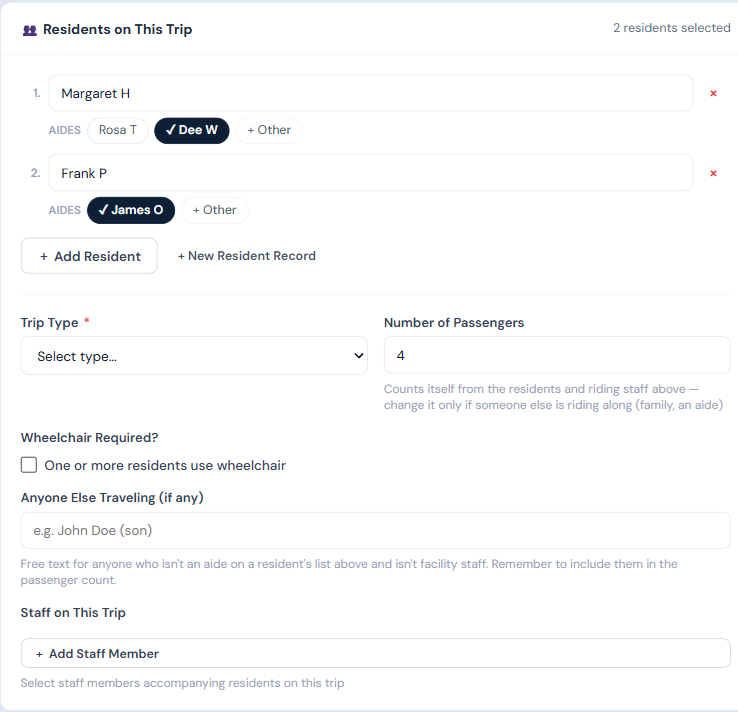
Aides are never attached for you. Residents often have several aides who come on different days, and a wrong name printed on a driver sheet is worse than a blank one — so choosing is always a deliberate tap.
Tap the chip again to detach them if plans change.
Someone who isn't on the list
Click + Other under that resident, enter a name and phone, and choose whether to also save them to that resident's aide list:
- Leave it unchecked for a one-time fill-in — they're on this trip only.
- Tick it and they're added to the resident permanently, so next time they're just a chip you can tap.
Add an outside (care-area) aide
- Go to 🧑💼 Staff and click + Add Staff.
- Enter their name and phone.
- Tick 🤝 Not a facility employee. The role switches to Trip-Only automatically — outside aides never get a login, so leave Email and Password blank.
- Optionally enter their Agency / Employer.
- Click 💾 Save.
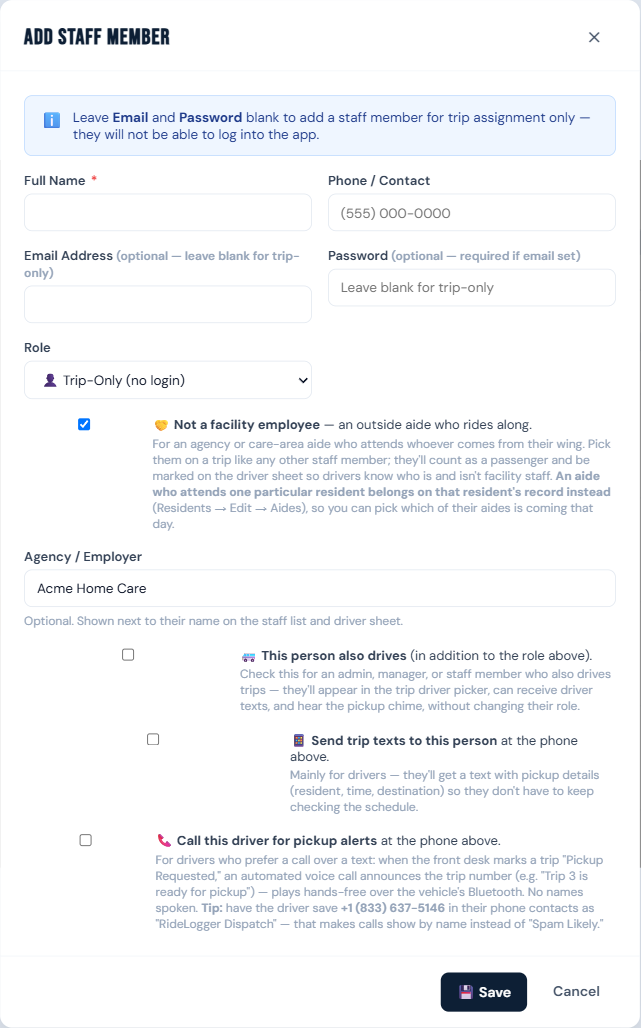
They now appear in the Staff on This Trip picker on every trip, tagged (Aide — Agency) so they're easy to tell apart from your own staff. Add them to a trip the same way you'd add any staff member.
What this changes on the trip
- Passenger count. Every attached aide counts as one seat, and Number of Passengers updates itself as you tap. If the same person is attached to two different residents on the same trip, they still count as one seat — they're one person in one chair.
- The wheelchair companion requirement. A wheelchair trip normally makes you type a companion name. If you've attached an aide, that's taken as the companion and you don't have to type anything.
- The driver sheet and printed receipt. Attached aides print with the resident they're attending — Rosa T (Margaret H) — with phone numbers on the receipt. Outside aides from the staff list are marked (aide) next to their name so the driver knows at a glance who is and isn't facility staff.
Who can do this
Staff, drivers, managers, and admins can add aides to a resident and attach them to trips. Adding an outside aide to the staff list requires a manager or admin.
Notes
- Aides are people, not accounts. A private aide never gets a login, and an outside aide is created as Trip-Only, which has no login either.
- RideLogger doesn't text aides. The phone number is there for the driver sheet and receipt. Texting is available for residents and drivers only — see Text a resident or driver.
- Editing or removing an aide from a resident doesn't change trips you've already booked. Each trip keeps its own record of who was attending, so your history stays accurate.
- If an aide was on a trip and has since been removed from the resident's list, editing that trip still shows them attached — they won't silently disappear from a trip that already happened.
- Anyone Else Traveling (further down the trip form) is still there for a family member or anyone who isn't an aide and isn't staff. Unlike aides, that field is free text and doesn't count a seat — add them to the passenger count yourself.