Core Features
How to approve or decline a trip
Some trips (weekend trips, or ones that break a scheduling rule) are saved as Needs Approval instead of Approved. A manager or admin has to review them.
Steps
- Open the trip from the Dashboard's "Trips Needing Approval" table (click Review), or from the 📅 Schedule view — trips needing review show a ⚠️ Needs Approval badge.
- The Review Trip dialog shows why it was flagged (e.g. "Appointment time is before transport begins" or a vehicle conflict), and a required-to-decline Reason field.
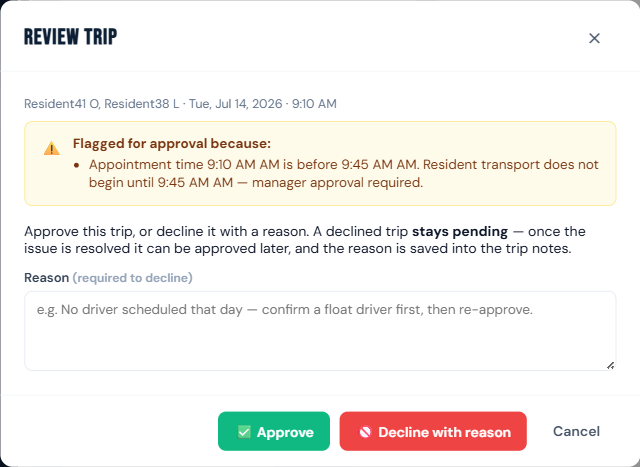
- Choose:
- ✅ Approve — the trip becomes a normal approved trip.
- 🚫 Decline with reason — enter why, and the trip stays pending (it isn't cancelled) so it can be corrected and approved later.
- A declined trip shows a "Previously not approved [by _name_] [on _date_]:" note with the decline reason, so staff know it needs another look.
Who can do this
Managers and admins only.
Notes
- A trip needs approval because it's a weekend trip (and weekends aren't enabled in Trip Rules), or it breaks a rule in Settings → Trip Rules (disallowed day, outside the transport window, or over the mileage limit). See Set your trip rules.
- Declining doesn't notify anyone automatically — tell the person who booked it to fix and resave.