Core Features
How to set your trip rules
Trip Rules (Settings section "🗓️ Trip Scheduling Rules") control which trips get auto-approved and which ones are flagged for a manager to review — allowed days for Doctor and Shopping/Errand trips, a weekend toggle, a transport time window, and per-type mileage thresholds.
Steps
- Go to ⚙️ Settings and scroll to 🗓️ Trip Scheduling Rules.
- Check "Allow weekend trips without manager approval" if you want weekend trips to save as normally approved. Leave it unchecked (the default) and any weekend trip is saved as Needs Approval instead.
- For Doctor appointment days and Shopping & errand days, check every day you want that trip type to run without approval — an unchecked day still lets the trip be booked, but saves it as Needs Approval. (Other trip types — outings, etc. — have no day restriction.)
- Set Transport window starts / Last pickup time, if you want one.
- For Doctor and Shopping/Errand trips, you can set two separate mileage numbers:
- "needs approval over (mi)" — a soft threshold; going over it saves the trip as Needs Approval.
- "hard limit (mi)" — going over this blocks the trip from being saved at all (an error toast names the max). Leave either blank for no restriction, and the needs-approval number must be lower than the hard limit.
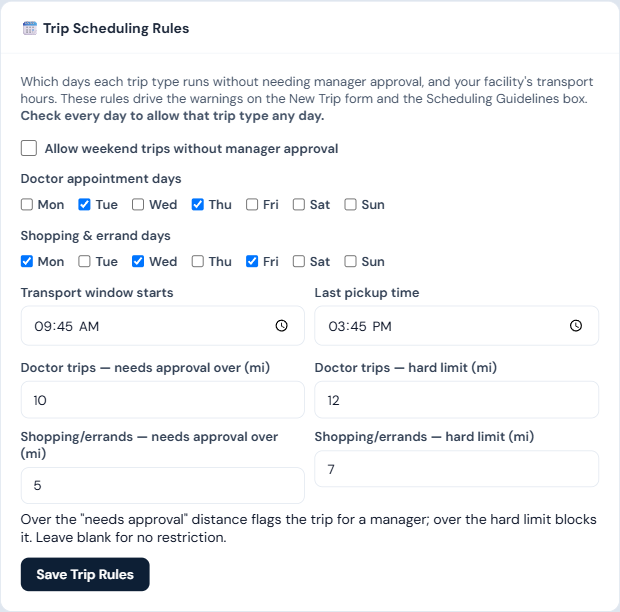
- Click Save Trip Rules.
Who can do this
Managers and admins only.
Notes
- Day and weekend rules only ever flag a trip as Needs Approval — they never block a save. See Approve or decline a trip. The mileage hard limit is the one setting that can outright block saving a trip.
- All fields are optional — a blank mileage field means no restriction for that threshold.