Core Features
How to preview the app as another role ("View as")
Admins can see the app the way a staff member, driver, manager, or trip-only user would see it — without logging out and back in.
Steps
- Look next to your name in the sidebar for the role dropdown (tooltip: "Preview the app as another role (display only — your real access is unchanged)").
- Choose a role — 👑 Admin, 📋 Manager, 🗂️ Staff, or 🚐 Driver.
- The sidebar label under your name updates to show "👁 [role]" (e.g. "👁 Driver") so you always know you're in preview mode, and the nav trims down to match — e.g. previewing as Driver hides Residents, Staff, Audit Log, Reports, and Settings.
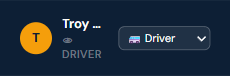
- Switch back to 👑 Admin the same way when you're done.
Who can do this
Real admins only — a manager or staff member previewing as a lower role is not a way to gain access to anything they couldn't already see.
Notes
- This changes what you see, not what you can actually write — the real permission checks are still enforced by the server regardless of the preview.
- There's no banner for this by design — the sidebar label is the only indicator.