Free Daily Driver Sheet Template for Senior Living Transportation
One page, landscape, big enough to read at arm's length in a moving van — with a box at the top for the changes that always arrive after the sheet is printed.
📄 Download the Daily Driver Sheet
A printable one-page sheet with ten trip rows. No email required — just take it.
Download the Daily Driver Sheet Need to type into it? Download the Excel version Prints landscape on Letter. Designed to stay legible in black and white, and after a photocopy or two.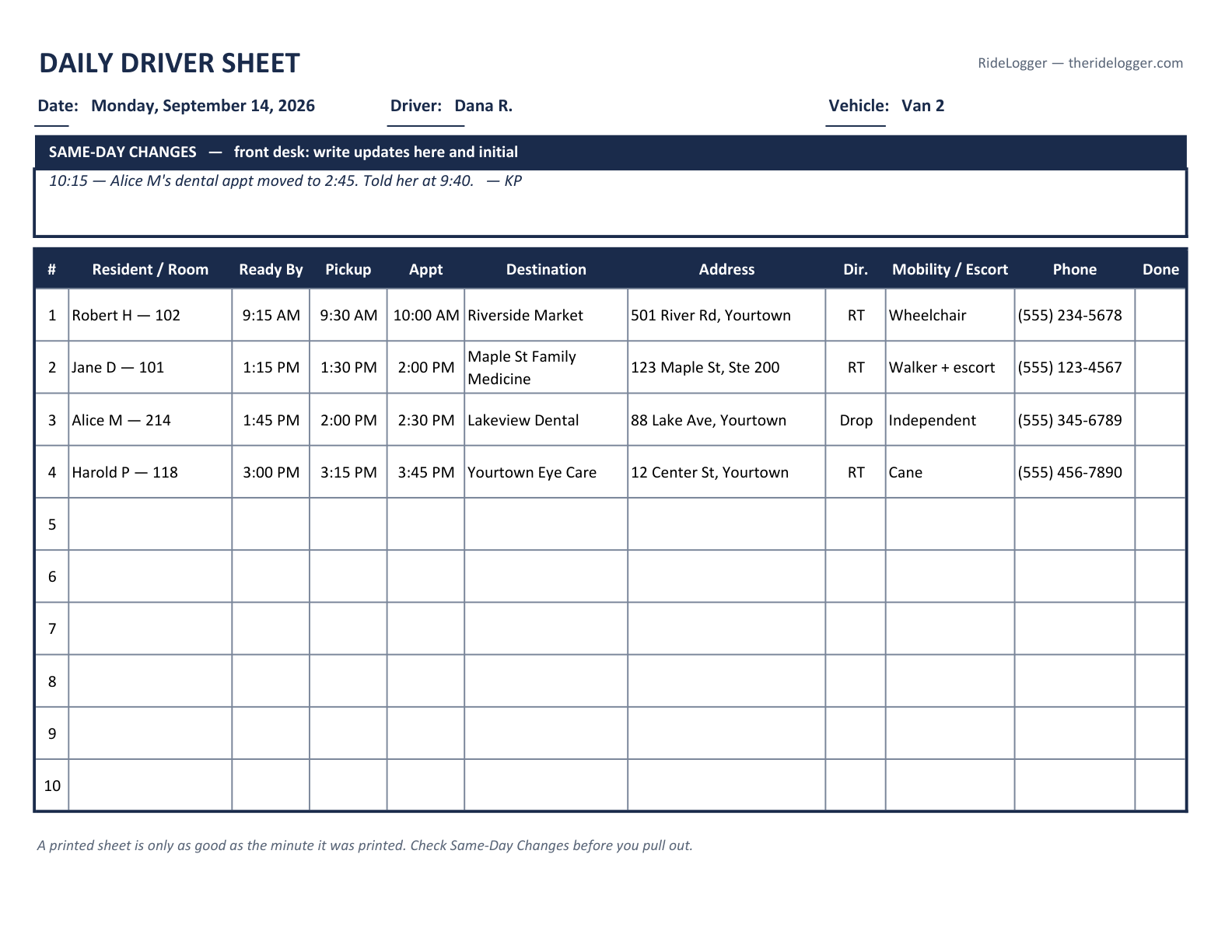
What belongs on a driver sheet
A driver sheet is not a copy of the schedule. It is the answer to one question — what does this driver, in this vehicle, need to know today? — and everything on it earns its place against that:
- Route order, not booking order. Number the rows in the sequence the driver will actually run them. A sheet sorted by when the trip was booked makes the driver re-sort it in their head at every stop.
- Ready-by time and pickup time. These are different instructions for different people. Ready-by is what the resident and the aide need; pickup is what the driver needs. A sheet with only one of them guarantees someone waits.
- The appointment time too. When traffic goes wrong, the appointment time is what lets a driver decide between hurrying and calling ahead.
- The full address, including suite and building. Medical plazas are where a good sheet quietly fails.
- Mobility and escort notes. Wheelchair, walker, oxygen, a companion riding along — this decides whether the trip fits the vehicle at all, and the driver needs it before arriving, not on the doorstep.
- A phone number that will be answered. The resident's, or a family member's, for the "running late" call.
- A completion box. One check per trip. It's how the front desk answers "did that ride actually happen?" without radioing the driver.
The same-day changes box
Every printed sheet starts going out of date the moment it leaves the printer. The appointment moves, the resident cancels, someone adds a pharmacy run on the way back — and the sheet in the van still says the old thing.
So there's a bordered box at the top, before the trips, for the front desk to hand-write updates and initial them. Two reasons it's at the top rather than the bottom: it's the part that invalidates everything below it, and a driver scanning the page in a parking lot reads from the top.
Worth saying plainly: a printed sheet is only as good as the minute it was printed. That's not a flaw in this template — it's the nature of paper. The fix isn't a better sheet, it's making sure the person printing it and the person changing the schedule are looking at the same thing.
Printing it
Landscape, Letter, one page. The PDF is set up that way already — print it as-is and it will fill the page without scaling the type down.
It's deliberately black-on-white with no color coding, because driver sheets get photocopied, faxed to a day program, and read in a van at dusk. Anything that depends on color is information that disappears on the second copy. Use the Excel version if you want to type trips in before printing, or add a column of your own.
The sheet is the easy part
RideLogger turns the live schedule into a printable driver sheet in one click — so the sheet the driver carries matches what the front desk is looking at, and the same-day change reaches both.
Start Your Free 30-Day Trial No credit card to start · Flat per-facility pricing from $199/month · Trial starts instantly